
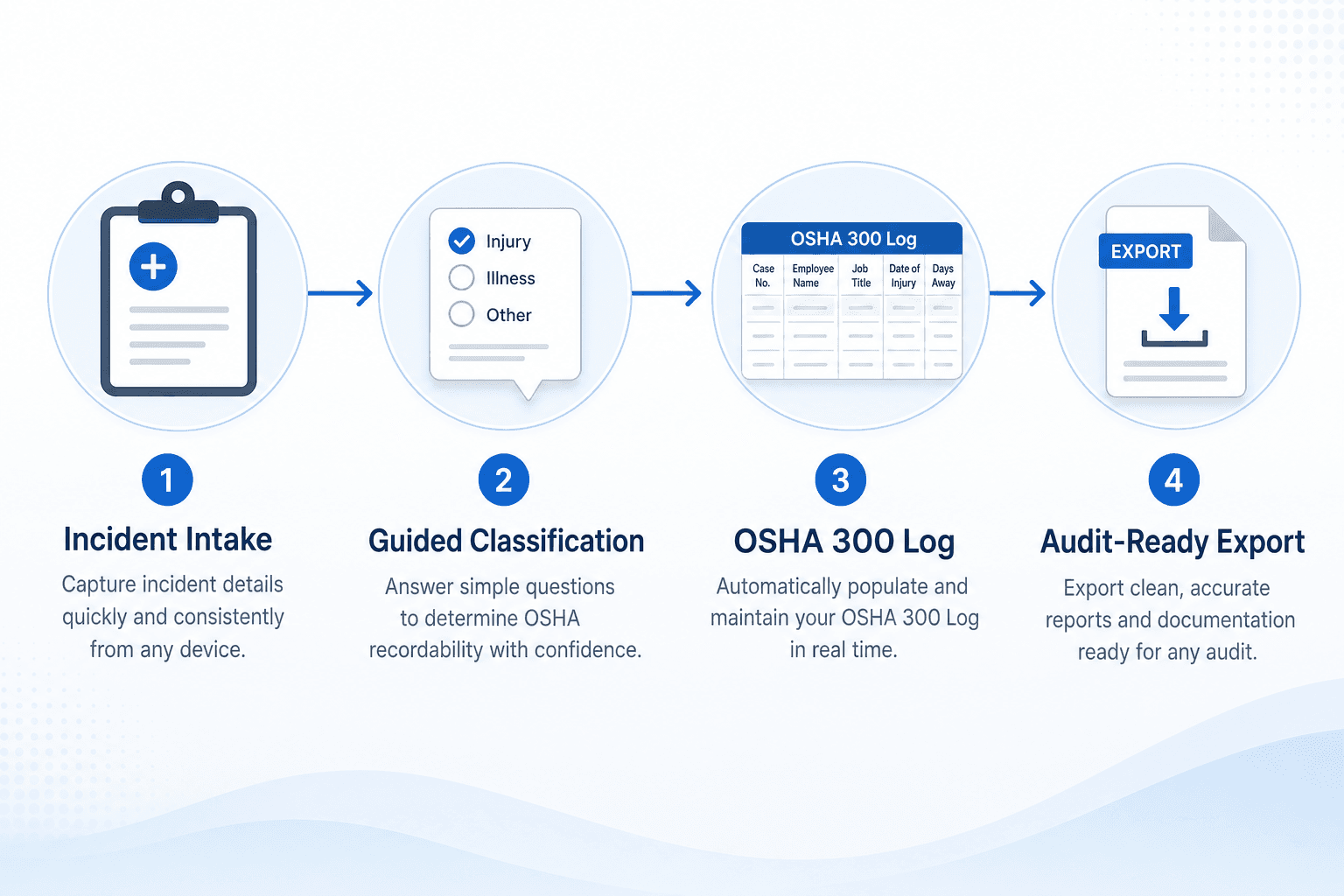
Manual OSHA 300 logging is a recurring compliance drag: scattered incident data, inconsistent classifications, and end-of-month clean-up when auditors are already asking questions. Provisio EHS helps EHS teams automate the log from intake to reporting so you spend less time reconciling spreadsheets and more time preventing incidents.
If you are evaluating EHS software, the goal is not more features. It is fewer audit surprises, faster recordkeeping, and cleaner data for leadership reviews.
Where OSHA 300 tracking breaks down
Most teams still run on a manual workflow that creates risk:
- Incident details live in multiple places (email, paper forms, HR systems, spreadsheets).
- Classification is inconsistent across sites or supervisors.
- Late or incomplete entries lead to 300 log gaps.
- End-of-period reporting becomes a scramble instead of a routine.
These gaps show up during OSHA inspections, workers’ compensation reviews, and executive safety reviews. When recordables are logged late (or classified differently at each site) you lose the ability to spot trends and defend your program under scrutiny.
What automation looks like with Provisio EHS
Provisio EHS automates the OSHA 300 process by connecting intake, classification, and reporting in one system:
- Centralized incident intake captures every recordable event in a single workflow.
- Guided OSHA classification standardizes decision-making across sites.
- Auto-generated 300 log entries build the log continuously (not at month-end).
- Ready-to-export reporting supports audits and annual summaries.
Explore the all-in-one platform at Provisio EHS Software. Optional expert support is available at EHS Consulting if you want help redesigning workflows before go-live.
Manual vs. automated workflow
Manual OSHA 300 Log
Incident happens → emails/spreadsheets → ad hoc classification → monthly log clean-up → audit stress

Automated with Provisio EHS
Incident happens → centralized intake → guided classification → live OSHA 300 log → audit-ready export
When intake and classification happen at the source, your 300 log stays current. Safety leaders stop rebuilding the log from fragments every quarter, and auditors see a coherent record instead of a reconstruction project.
Automation outcomes that matter to EHS leaders
Automation is not about speed alone. It is about trust and audit readiness:
- Fewer missing or late records because data is captured at the source.
- Cleaner, more defensible classifications for audits.
- Consistent reporting across sites without manual reconciliation.
- Better insights from safety data analysis for prevention planning.
Teams that automate OSHA recordkeeping typically see faster close-out on investigations, fewer re-work cycles before annual reporting, and clearer visibility into recordable trends by department or location.
If you need budget alignment, review how automation compares to manual effort on our pricing page.
Step-by-step: moving from spreadsheets to an automated 300 log
1. Map your current intake paths
List every way a recordable enters your system today: supervisor email, HR injury reports, clinic notes, near-miss escalations. Automation starts by funneling those paths into one digital workflow so nothing bypasses classification rules.
2. Standardize classification with guided prompts
OSHA recordability decisions should not depend on who happened to receive the form. Use guided prompts aligned to OSHA criteria so supervisors and safety staff apply the same logic every time, with an audit trail showing who confirmed each entry.
3. Connect incidents to corrective actions and training
A 300 log entry is only useful if it drives prevention. Link recordables to corrective actions, training assignments, and follow-up inspections so leadership sees closure, not just a line on a log.
4. Export audit-ready reports on demand
When an inspector or executive asks for the log, you should not need three days to reconcile spreadsheets. Automated systems produce current 300/301 views and summary data when you need them.
How Provisio EHS supports OSHA 300 automation
Provisio EHS Software was built by safety professionals who have managed OSHA logs under audit pressure. The all-in-one platform ties incident reporting, classification, OSHA 300/301 recordkeeping, corrective actions, and training into one system, so your log reflects what actually happened on the floor. No consulting engagement is required to automate your 300 log.
Want help redesigning the workflow before you go live? Provisio EHS Consulting offers optional OSHA compliance audits, program assessments, and fractional safety leadership to align people, process, and software.
Ready to see the automation workflow end-to-end?
Book a software demo and we will walk through incident intake, guided classification, and live OSHA 300 log reporting in Provisio EHS.
- Request a software demo: see incident intake, classification, and OSHA log reporting live
- Compare pricing: find the right plan for your team size and sites
- Optional consulting: expert help scoping your recordkeeping workflow if you need it
LinkedIn share snippet
Manual OSHA 300 logging is still one of the biggest time sinks in EHS compliance. In our latest post, we show how Provisio EHS all-in-one software turns intake, classification, and reporting into a single, audit-ready workflow, reducing month-end scramble and improving data quality.
Read: How to Automate Your OSHA 300 Log. CTA: Request a demo via Provisio EHS Software.
Ready to Improve Your Safety Management?
Explore Provisio EHS solutions to streamline compliance and protect your workforce.
Schedule Your OSHA Audit
Let our industrial hygiene professionals identify your compliance gaps before regulators do.
Try Provisio EHS Free
Get 30 days of full access to our safety management platform. No credit card required.
Start Your Free TrialSee How It Works Together
Explore our Audit + Software Implementation Bundle. Get compliant and automate faster.
Get Bundle Pricing