White paper · Provisio EHS (Safety Management Suite)
Product: Provisio EHS Safety Management Suite: suite.provisioehs.com
Audience: EHS directors, safety managers, operations leaders, IT / security reviewers, and procurement
Safety-Chat, LLC DBA Provisio EHS
Product screenshots
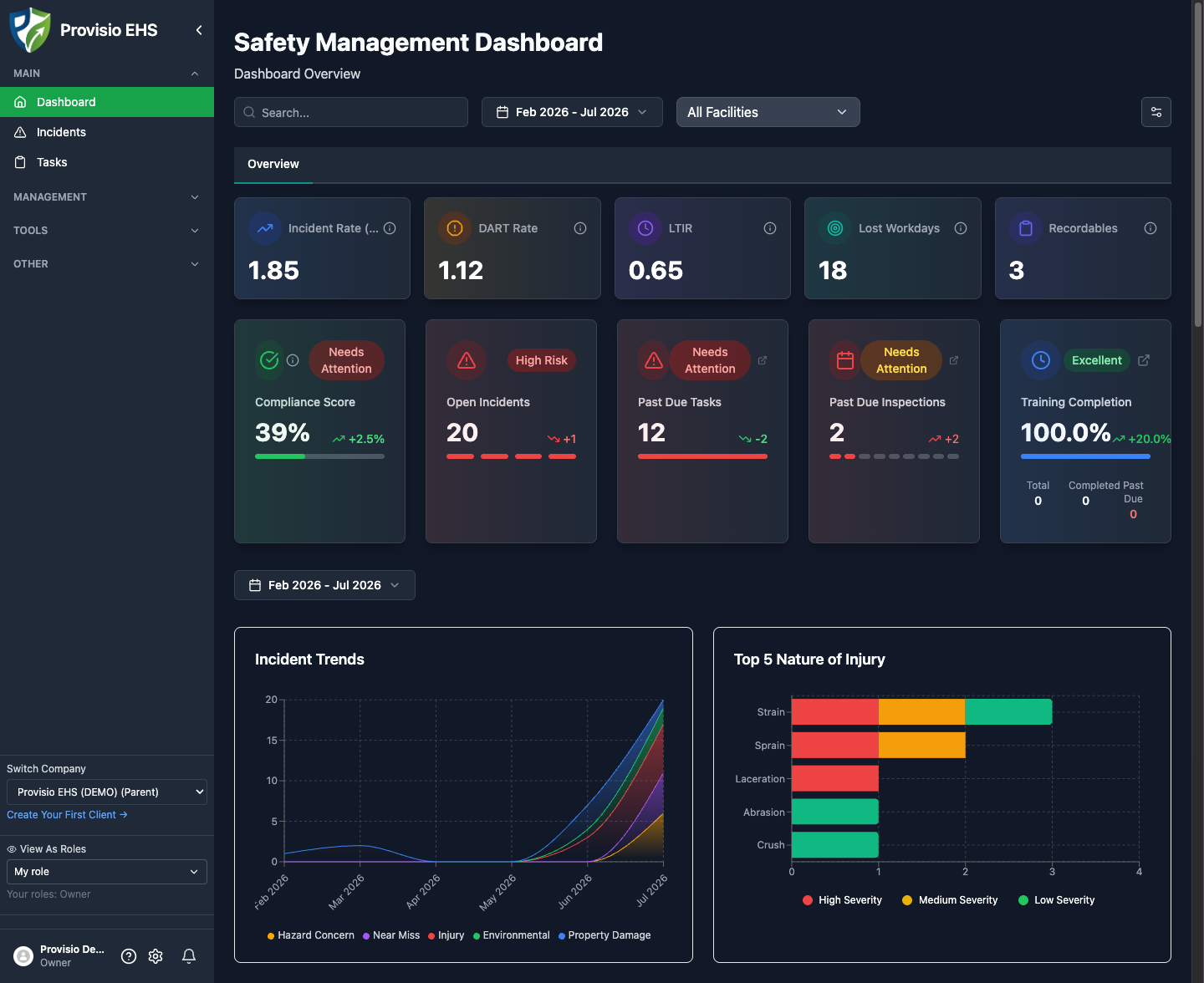
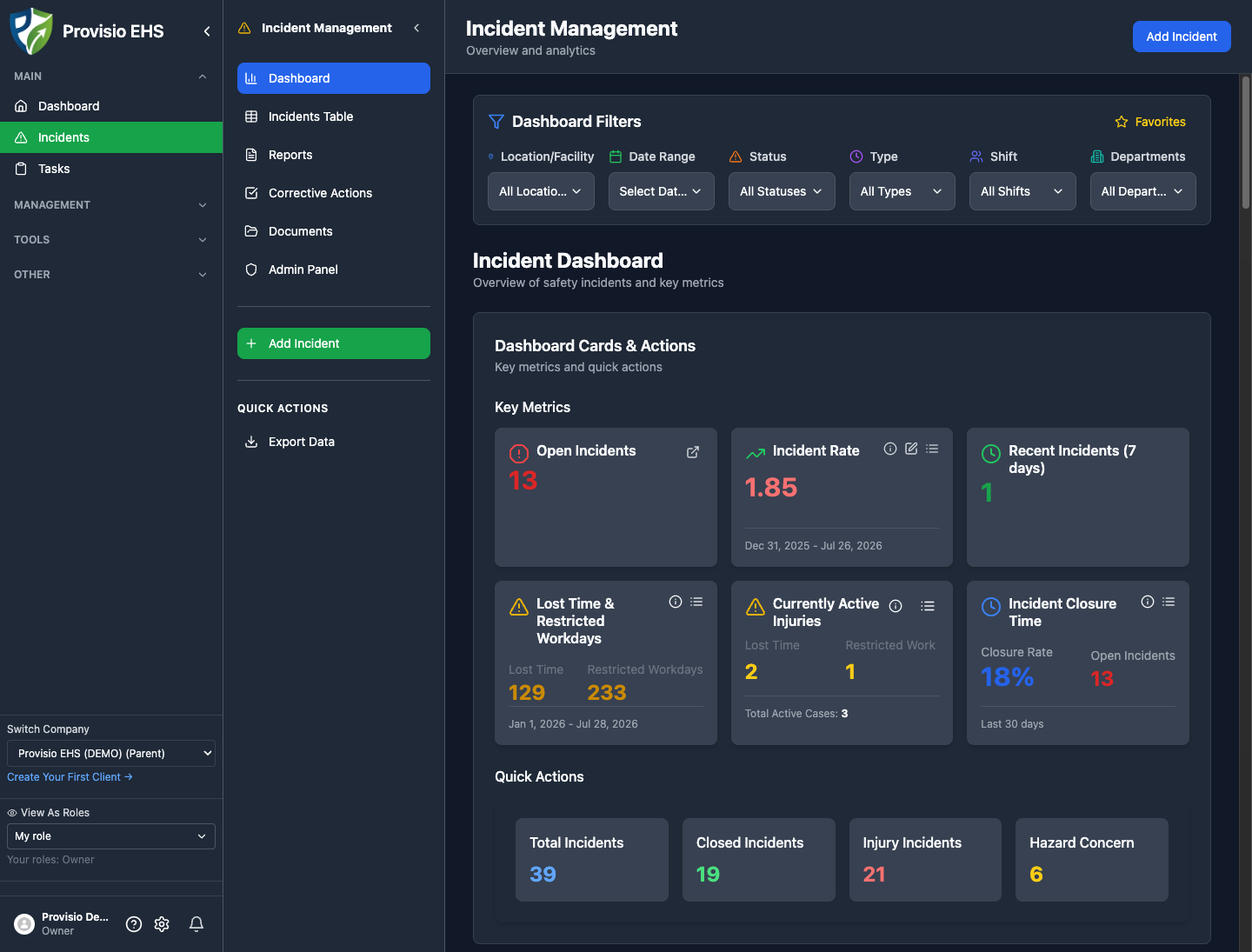
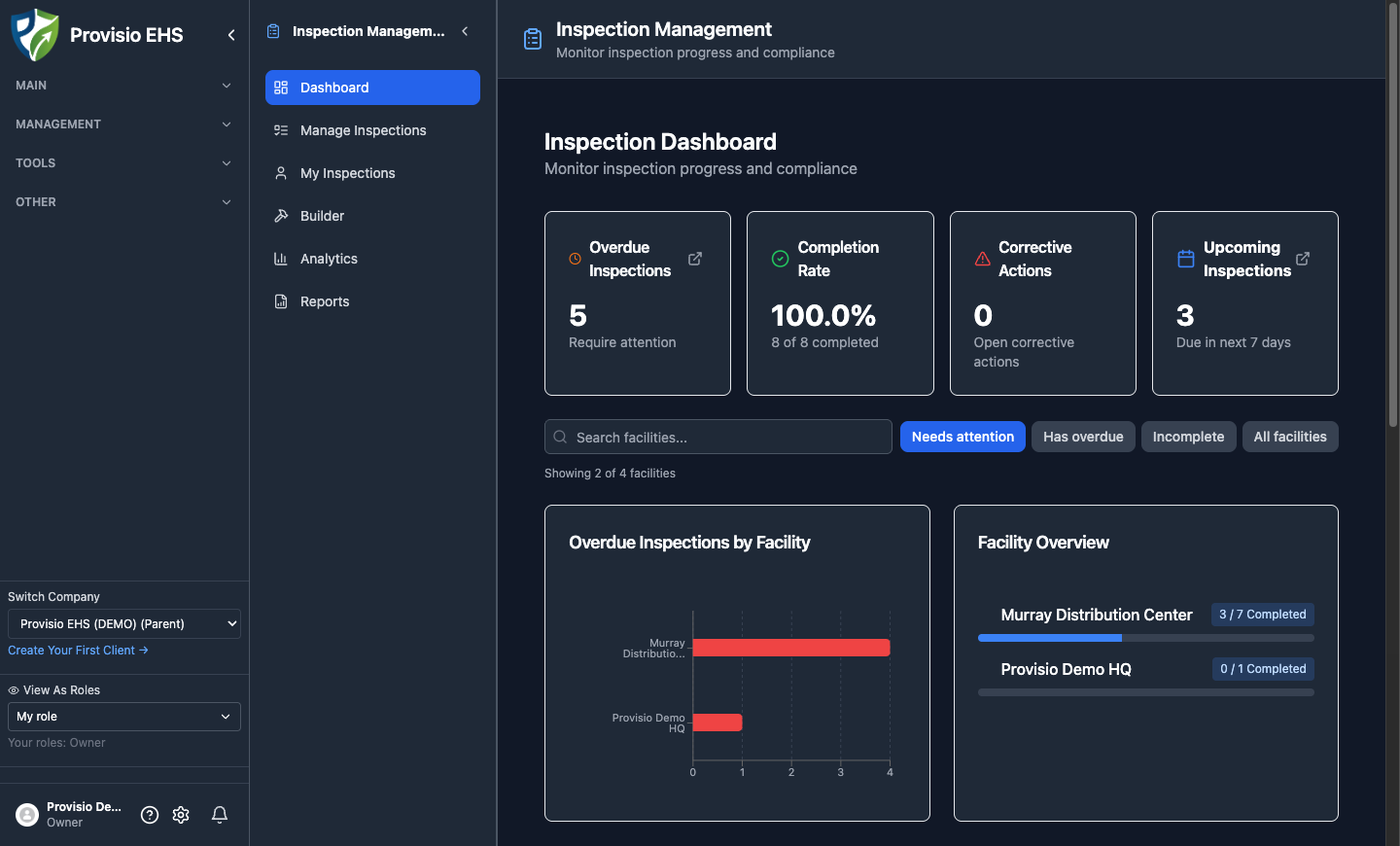
Screenshots below are from the Provisio EHS safety management suite (demo company).
Executive summary
Most organizations do not fail safety because they lack policies. They fail because critical information lives in too many places: shared drives, email threads, paper forms, disconnected LMS tools, and spreadsheet trackers nobody fully trusts.
When an incident, audit, customer questionnaire, or claim arrives, leaders need answers fast:
- What happened, where, and who was involved?
- Were training and procedures current?
- Was the chemical or equipment hazard known?
- Who was notified, and what corrective actions followed?
- Can we prove this to auditors, insurers, customers, or regulators?
If those answers take days of hunting, the program is not defensible, even when frontline teams are working hard.
Provisio EHS is a unified safety management suite that replaces fragmented workflows with one operating system for risk: incidents, inspections, tasks, training, LMS, SDS, SOPs, assets, contractors, JSAs, LOTO, meetings, and AI-assisted safety tools, backed by role-based access, audit-minded logging, and a security program built for enterprise buyers.
This white paper explains:
- Why fragmented EHS creates invisible risk
- What a modern, defensible program looks like
- How Provisio’s full module set maps to that model
- How security and trust are designed into the platform
- A practical 90-day adoption roadmap and buyer checklist
1. The problem: fragmented EHS creates invisible risk
Safety programs often grow organically. A company starts with a basic incident form. Then someone adds a training tracker. SDS files go into a shared folder. Contractor packets live in email. Corrective actions sit in a project board, or someone’s inbox.
Each piece may work locally. Together, they create four systemic failures:
Delayed visibility
Leaders learn about serious issues late, or incomplete. Near misses are underreported because reporting feels slow or punitive. Trends stay hidden until a major event forces attention.
Broken handoffs
An incident is logged, but corrective actions are vague. Training is assigned, but completion is hard to verify by role or site. SDS updates happen, but field teams still pull old PDFs.
Weak defensibility
Audits and customer questionnaires ask for evidence, not intentions. Missing timestamps, incomplete ownership, and inconsistent records create exposure.
Operational drag
When systems are hard to use, people work around them. Workarounds feel efficient in the moment and expensive later, especially after an incident, claim, or failed audit finding.
Fragmentation is not a software preference problem. It is a risk concentration problem.
2. What “good” looks like
A modern EHS program does not require perfection. It requires reliable signal and reliable proof.
High-performing programs share these traits:
- One source of truth for incidents, actions, training, documents, and hazard data
- Role-based workflows so the right people see the right work
- Mobile-friendly field capture so reporting happens where work happens
- Closed-loop corrective actions with owners, due dates, and verification
- Training linked to exposure, not only generic annual checkboxes
- Chemical and contractor controls that are current and findable
- Records and access controls that stand up under scrutiny
Simple test:
If a customer, insurer, or regulator asked tomorrow for the last 12 months of incidents, open corrective actions, training status for affected roles, and related SDS records. Could your team produce that in hours, not weeks?
3. Introducing Provisio EHS
Provisio EHS (Safety-Chat, LLC DBA Provisio EHS) is a cloud safety management suite used by organizations that need day-to-day operational control, not another filing cabinet.
Designed for:
- Mid-market and multi-site industrial, construction, manufacturing, energy, and services companies
- EHS teams that need field adoption and audit-ready evidence
- Consultants and carriers who support many client companies from one platform
Core promise:
Report → notify → investigate → correct → verify → learn, with modules that connect, and security that scales with your company.
4. Platform modules (full suite)
Below is the module map for the Provisio EHS suite. Modules can be enabled by package / add-on.
4.1 Main operations
Dashboard
A single home base for what needs attention: open work, recent activity, and shortcuts into the modules your team uses most.
Incidents
Capture injuries, near misses, vehicle events, property damage, and custom incident types. Route notifications by role, track investigations, manage corrective actions, and keep a clear change history for updates.
Why it matters: Early signal + closed-loop actions beat end-of-month spreadsheet reviews.
Tasks
Operational follow-through outside a single incident: assignable work with ownership and visibility so safety actions do not disappear into email.
4.2 Management modules
Form Management
Build and manage the forms your organization actually uses, so data collection matches your process instead of forcing every site into a one-size-fits-all PDF.
Inspection Management
Plan and run inspections, capture findings in the field, and convert issues into corrective work. Consistent inspection discipline is one of the highest-leverage leading indicators in any EHS program.
SDS Management & SDS Database
Searchable chemical inventory, controlled access to Safety Data Sheets, refresh workflows, and field-friendly lookup, so the SDS people pull in an emergency is the current one.
Note: In-app SDS support is assistive. Organizations should still verify manufacturer-official SDS where regulatory authority requires it.
SOPs (Documents)
Centralize standard operating procedures and related safety documents so teams are not hunting shared-drive versions during audits or onboarding.
Training Management
Track required training, completions, and expirations by person and role. Ideal when you need competency visibility without standing up a full LMS on day one.
LMS (Learning Management)
In-house learning: course catalogs, assignments, learner progress, and admin enrollment, so training is tied to real exposure and managers can see who is cleared for what work.
Asset Database
Equipment and asset records that support maintenance-minded safety programs: departments, locations, and asset context that connect to how work is actually done.
Contractor Management
Bring contractor onboarding, requirements, and ongoing visibility into the same safety system your employees use, reducing the “contractor black box” that shows up in too many serious incidents.
Ergonomic Evaluations
Structured ergonomic assessment workflows for organizations that treat musculoskeletal risk as a managed program, not an afterthought.
4.3 Field & compliance tools
JSA Tool
Job Safety Analyses that are usable before the work starts, not buried in a binder after the job.
LOTO Tool
Lockout/Tagout workflows that support energy-control discipline with clearer records and accountability.
Meetings
Safety meetings with structure and records: attendance, topics, and follow-ups that survive an audit request.
Blast Notifications
Reach the right people quickly when a message cannot wait for the next toolbox talk.
4.4 AI-assisted productivity tools
These tools help EHS and supervisors move faster without replacing professional judgment:
| Tool | What it helps with |
|---|---|
| Advanced SOP Generator | Draft richer SOPs from structured inputs |
| Basic SOP Generator | Faster first drafts for simpler procedures |
| Email Assistant | Clearer safety communications |
| Hazard Identifier | Structured hazard thinking for a job or area |
| Toolbox Talk Generator | Ready-to-run talk outlines for crews |
These tools are time savers for competent professionals, not autopilot compliance.
4.5 Administration, support & specialized programs
Admin
Company configuration, roles, and administrative controls that keep the suite aligned to how your organization works.
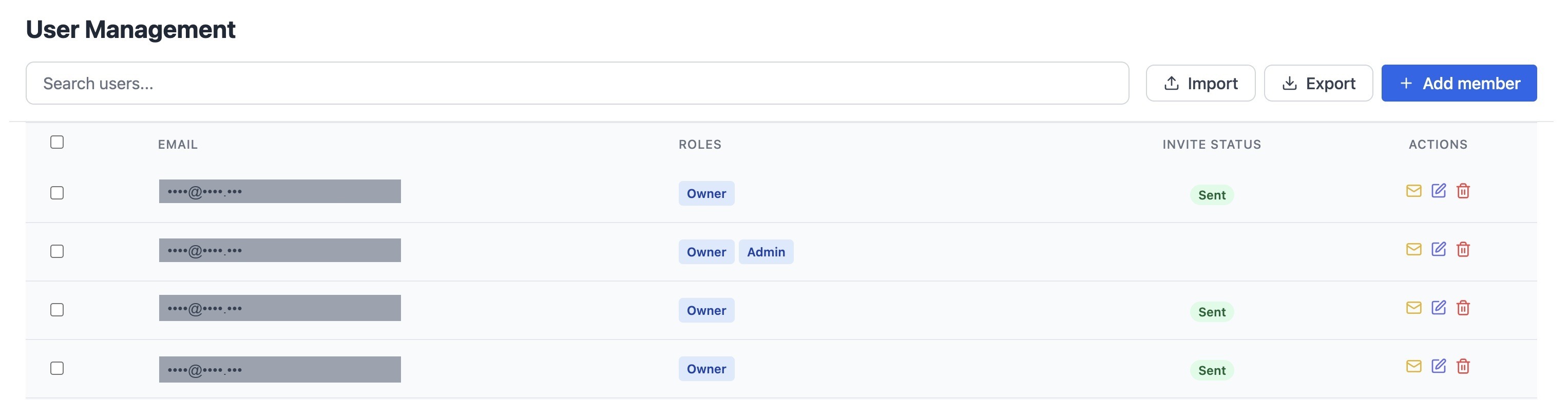
User and people administration in the suite.
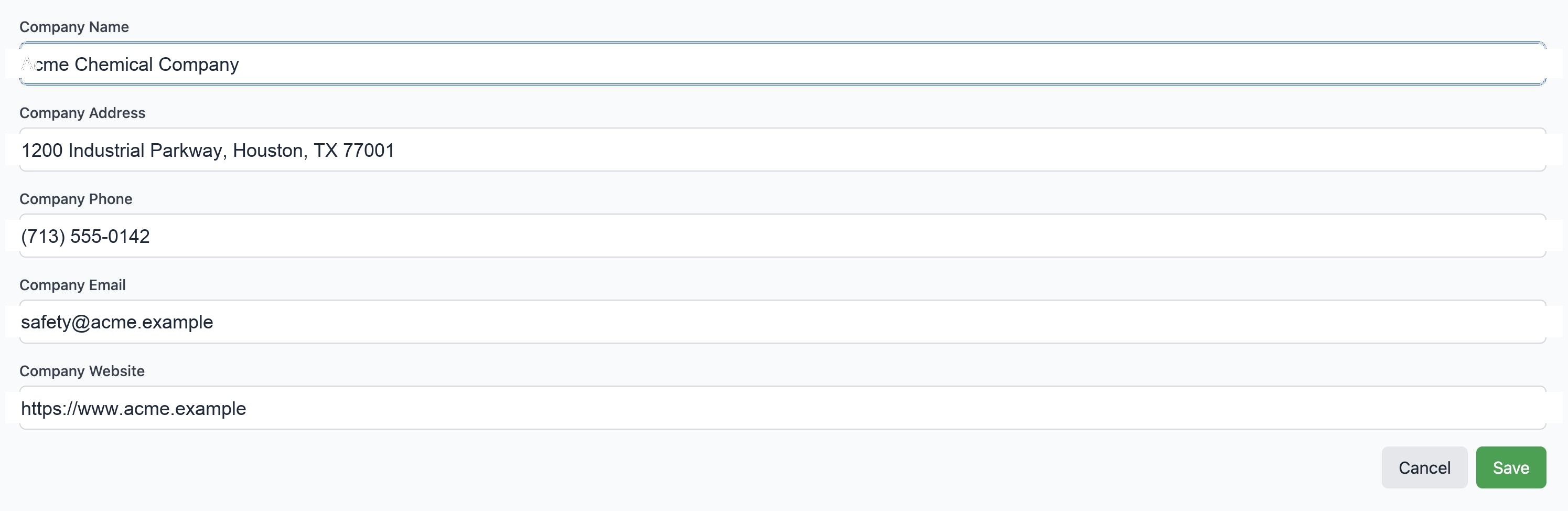
Company profile & structure
Locations, departments, positions, and company profile setup, so incidents, training, and assets map to real org structure.
Client Management (consultants)
For consultant / multi-client operators: manage client companies from one administrative surface.
Carrier Book (insurance programs)
For carrier / loss-control programs: book-level visibility, entitled vs active accounts, and stewardship-oriented views across policyholders (white-label capable).
Subscription Management
License and package visibility for owners and admins, so commercial entitlements match what sites can access.
Support Desk
In-app help via ticketed support, so issues are tracked, not lost in personal inboxes.
5. How the modules work together (the closed loop)
| Field signal | System of record | Proof |
|---|---|---|
| Incident / near miss | Notify roles | |
| Inspection finding | Corrective action | Verify closeout |
| JSA / LOTO / Meeting | Records | |
| SDS / SOP lookup | Current documents | |
| Training / LMS | Competency evidence | Audit pack |
| Contractor / Asset | Context for risk |
Example closed-loop flow
- A supervisor reports a near miss from a phone.
- The right roles are notified.
- A corrective action is assigned with a due date.
- Related training is checked for the crew.
- The SDS for the involved product is confirmed current.
- Leadership reviews open actions on the dashboard.
- At audit time, the evidence trail is exportable, not reconstructed from memory.
That is the difference between a suite and a stack of disconnected apps.
6. Security, privacy & trust
Enterprise buyers should evaluate EHS software like any other system of record for sensitive operational data.
6.1 Security posture
Provisio EHS maintains a SOC 2 Type II compliance program that is underway.
A SOC 2 Type II examination is in progress. Upon completion, report materials may be shared with customers under appropriate confidentiality terms.
Current posture includes:
- Security and change-management practices are designed to align with SOC 2 expectations
- Tenant isolation and least-privilege access are first-class design goals
- Sensitive operational data is treated as company-scoped
- Audit-minded logging is used for meaningful create/update/delete activity in business workflows
6.2 Access control highlights
| Control | What buyers care about |
|---|---|
| Company / tenant scoping | Users see their company’s data, not another tenant’s |
| Role-based permissions | Owners, admins, supervisors, and specialists get least privilege |
| Invite & identity controls | Predictable onboarding; SSO options where enabled |
| Multi-company / consultant / carrier models | Real-world org structures without shared-password chaos |
| Admin surfaces | Clear places to manage users, roles, and company structure |
6.3 Data & operational integrity
- Timestamps on business records (
created/updatedpatterns) - Change history for sensitive workflows such as incident updates
- Append-oriented audit trails for security-relevant events (who / when / what changed, not secrets or full PII in logs)
- Environment separation for development, staging, and production practices on the engineering side
6.4 Usability that supports security
Security fails when people share passwords or export everything to personal drives because the tool is painful.
Provisio invests in day-to-day usability (including responsive layouts and dark mode) so field and office users stay in the system of record.

6.5 How we describe our security posture
For procurement and IT reviewers, here is how we describe Provisio EHS today:
- SOC 2 Type II program underway. A Type II examination is in progress. When the examination is complete, report materials may be shared with customers under NDA or equivalent confidentiality terms.
- Company-scoped access and role-based permissions are core design goals. Users work within their company’s data under least-privilege roles.
- Audit-ready operational records: timestamps, change history on sensitive workflows, and append-oriented audit trails for meaningful create/update/delete activity.
- SSO and enterprise identity options are available depending on package and configuration.
A few scope notes that help set accurate expectations:
- In-app SDS tools assist chemical-hazard workflows; customers remain responsible for verifying manufacturer-official SDS for regulatory compliance.
- Outcomes such as claim reduction or loss-ratio improvement depend on how each organization uses the system and are not guaranteed by the software alone.
6.6 Enterprise readiness
For IT, security, and procurement reviewers evaluating fit beyond day-to-day EHS workflows:
- SSO / enterprise identity. SSO options (including SAML- and OIDC-style integrations) are available depending on package and configuration.
- Role-based, company-scoped access. Permissions follow least-privilege roles, with tenant isolation so users work within their company’s data.
- Audit-minded logging. Sensitive create, update, and delete activity is logged with who, when, and what changed.
- SOC 2 Type II underway. The program and examination are in progress; when complete, the report may be shared under NDA.
- Optional HR / workforce sync. HR and workforce sync options are available to reduce duplicate user administration.
- Multi-site and partner models. Supports multi-site operations, multilingual workforce needs, and consultant or carrier multi-company structures described earlier in this paper.
7. Five pillars of a defensible EHS system (with Provisio mapping)
| Pillar | What good looks like | Provisio modules |
|---|---|---|
| 1. Signal people will use | Fast field reporting, clear types, smart notifications | Incidents, Inspections, Blast Notifications, Dashboard |
| 2. Closure discipline | Owners, due dates, verification | Tasks, Incidents corrective actions, Inspections findings |
| 3. Training tied to exposure | Role-based assignment + history | Training Management, LMS |
| 4. Current hazard information | Findable, refreshable chemical & procedure data | SDS Database, SOPs, Asset Database, JSA, LOTO |
| 5. Access & auditability | Least privilege + evidence | Admin, roles, Support Desk, security controls |
8. 90-day adoption roadmap
Days 1-30: Stabilize the core loop
- Configure locations / departments / roles
- Launch incidents + notifications for 1-2 pilot sites
- Turn on corrective actions with owners and due dates
- Weekly open-actions review
Metric: % of incidents with an owner within 24 hours
Days 31-60: Connect competency & documents
- Map high-risk roles to training / LMS assignments
- Clean active SDS set; assign refresh ownership
- Publish critical SOPs into the system of record
- Manager views for overdue training and open actions
Metric: Overdue training and overdue actions trending down
Days 61-90: Expand and harden
- Roll out inspections, JSA/LOTO, meetings as needed
- Add contractor or asset modules if in scope
- Run a mock audit: produce an evidence pack in one sitting
- Remove friction from field workflows
Metric: Evidence pack in hours; sustained field adoption
9. Buyer checklist
Score each item 1-5 in demos.
Usability
- Field user can submit an incident in a few minutes on mobile
- Screens work on phone, tablet, and desktop
- Multilingual workforce support where needed
Workflow strength
- Configurable roles and notifications
- Corrective actions with owners, due dates, verification
- Incident update history is human-readable
Training & competency
- Role-based assignment and completion tracking
- LMS option when you outgrow a simple tracker
Chemical / document / asset control
- Searchable SDS inventory + refresh process
- SOP library
- Asset / contractor context when those risks matter
Field tools
- JSA, LOTO, meetings, inspections available without bolt-on chaos
Governance & security
- Tenant isolation and role-based permissions
- Transparent SOC 2 Type II program status (examination underway; report shared when available under NDA)
- Admin controls without constant vendor tickets
Commercial fit
- Package / add-ons match how you buy (core + SDS + LMS + contractor, etc.)
- Implementation path measured in weeks, not quarters
10. The business case leaders approve
Tie the suite to outcomes operations and finance already understand:
- Earlier signal → fewer late surprises
- Faster corrective-action closeout → fewer repeat findings
- Lower audit prep cost → evidence retrieval instead of archaeology
- Stronger customer / insurer confidence → cleaner questionnaires and renewals
- Scalable growth → new sites, contractors, and clients without reinventing process
Baseline before you start (two numbers are enough):
- Average days to close corrective actions
- Hours spent preparing the last major audit or customer evidence request
Re-measure at 90 days. That delta is your business case.
11. Conclusion
A binder of policies is not a safety system.
A folder of PDFs is not chemical control.
A spreadsheet of courses is not competency assurance.
Defensibility comes from connected workflows, and from a platform people will actually use.
Provisio EHS brings the full suite together: incidents, inspections, tasks, training, LMS, SDS, SOPs, assets, contractors, ergonomics, JSA, LOTO, meetings, AI-assisted tools, admin, and support, with security practices designed for serious buyers and a SOC 2 Type II program underway.
The goal is not more documentation.
The goal is fewer surprises, and stronger proof when it matters.
Next steps
- Book a module-mapped demo of the Provisio EHS suite (your sites, your risk profile).
- Run the evidence-in-hours test on your current stack.
- Pilot one site for 30 days on the core incident → action loop.
- Expand into SDS, LMS, contractors, and field tools once adoption is real.
Web: https://suite.provisioehs.com
Brand: Provisio EHS · Safety-Chat, LLC
© Safety-Chat, LLC DBA Provisio EHS.