
The Cost of Slow Incident Response
Consider these two scenarios:
Scenario A: Paper-Based Incident Management
An employee slips on an oil spill and sprains their ankle at 10:00 AM.
- 10:15 AM: Supervisor writes notes on a clipboard
- 12:30 PM: Paper form is filled out during lunch break
- 3:00 PM: Form is scanned and emailed to safety manager
- Next day: Safety manager reviews form and starts investigation
- Day 3: Witness statements are collected (memories already fading)
- Day 7: Photos are taken (hazard already cleaned up, context lost)
- Day 14: Root cause analysis is finally completed
- Day 30: Corrective actions are assigned (via email)
- Day 90: Someone remembers to check if corrective actions were completed
Result: Inadequate investigation, delayed corrective actions, recurring incidents, and frustrated employees who see nothing change.
Scenario B: Digital Incident Management
An employee slips on an oil spill and sprains their ankle at 10:00 AM.
- 10:15 AM: Supervisor reports incident from phone with photos of hazard
- 10:20 AM: Safety manager receives instant notification
- 10:30 AM: Digital investigation form is sent to supervisor
- 11:00 AM: Witness statements are collected via mobile app
- 1:00 PM: Root cause analysis completed with 5 Whys template
- 2:00 PM: Corrective actions auto-assigned to maintenance with due dates
- Day 7: Automated reminder sent to maintenance for corrective action
- Day 10: Maintenance uploads photo of completed repair
- Day 14: Safety manager verifies completion and closes incident
Result: Thorough investigation, rapid corrective actions, prevented future incidents, and employees see immediate response.
The difference: 90 days vs. 14 days to close the incident. That's an 85% reduction in response time.
Why Traditional Incident Management Fails
1. Delayed Reporting
Paper forms create barriers to reporting:
- Employees delay reporting minor incidents until they have time to "fill out paperwork"
- Forms are lost, incomplete, or illegible
- Incidents that occur on night shifts or weekends aren't reported until Monday
- Fear of paperwork discourages near-miss reporting
Impact: Safety managers don't learn about incidents until it's too late to conduct effective investigations.
2. Information Loss
Critical investigation details are lost with paper-based systems:
- Photos aren't taken or are stored separately from the report
- Witness statements rely on memory days or weeks after the event
- Environmental factors (lighting, weather, equipment status) aren't documented
- Timeline of events becomes fuzzy
Impact: Root cause analysis is based on incomplete information, leading to ineffective corrective actions.
3. Disconnected Corrective Actions
Even when corrective actions are identified, paper systems fail to ensure completion:
- Corrective actions are noted in reports but never formally assigned
- No tracking system to monitor progress
- No reminders or escalations for overdue items
- Verification of completion doesn't happen
Impact: The same hazards cause injuries repeatedly.
4. No Data Analysis
Paper reports sit in filing cabinets with no way to identify trends:
- Can't easily identify which departments have the most incidents
- Can't analyze injury types or root causes across multiple events
- Can't measure leading indicators like near-miss reporting rates
- Can't demonstrate safety program effectiveness to leadership or insurance carriers
Impact: Reactive instead of proactive safety management.
5. OSHA 300 Log Nightmares
Maintaining OSHA 300 logs from paper incident reports is time-consuming and error-prone:
- Manual data entry introduces errors
- Incident classification mistakes (recordable vs. non-recordable)
- Missing entries or incorrect dates
- Days away from work and job transfer/restriction calculations are manual
- Annual summary (300A) requires manual tallying
Impact: OSHA citations during inspections for recordkeeping violations.
How Digital Incident Management Transforms Safety
Modern incident management software doesn't just digitize paper forms, it fundamentally changes how organizations respond to incidents.
1. Mobile-First Reporting
Employees and supervisors report incidents instantly from phones or tablets:
✅ Photo capture at the scene while evidence is fresh ✅ GPS location automatically recorded ✅ Timestamp documenting when incident occurred ✅ Voice-to-text for easier statement collection ✅ Offline capability for areas without network coverage
Result: Incident reports are submitted within minutes, not days.
2. Guided Investigation Workflows
Digital forms guide users through thorough investigations:
✅ Required fields ensure critical information isn't missed ✅ Conditional logic shows relevant questions based on incident type ✅ Pre-populated data (employee info, location) reduces data entry ✅ Investigation templates for OSHA recordability, root cause analysis, and severity classification ✅ Witness statement collection via email or mobile app
Result: Consistent, complete investigations every time.
3. Automated OSHA 300 Log Maintenance
Forget manual data entry and calculations:
✅ Auto-classification of recordable injuries based on OSHA criteria ✅ Automatic calculation of days away, restricted, or transferred ✅ Real-time OSHA 300 log updated as incidents are reported ✅ One-click 300A summary generated for annual posting ✅ DART and TRIR calculations updated automatically
Result: Always audit-ready OSHA logs with zero manual effort.
4. Root Cause Analysis Tools
Built-in templates guide systematic root cause identification:
- 5 Whys methodology to dig deeper than surface-level causes
- Fishbone (Ishikawa) diagrams for complex incidents
- Timeline reconstruction showing sequence of events
- Contributing factors checklists (human factors, equipment, environment, management systems)
Result: Corrective actions address root causes, not just symptoms.
5. Corrective Action Tracking
Generate corrective actions directly from incident investigations:
✅ Automatic assignment to responsible parties ✅ Due dates based on priority and risk ✅ Automated reminders and escalations ✅ Photo verification of completed work ✅ Link back to originating incident for traceability
Result: Corrective actions are tracked and completed, not forgotten.
6. Analytics and Trend Identification
Transform incident data into actionable insights:
📊 Incident dashboards showing rates, trends, and patterns 📊 Heat maps identifying high-risk departments and locations 📊 Leading vs. lagging indicators (near-misses vs. injuries) 📊 Root cause frequency showing which issues recur 📊 Time-to-closure metrics measuring investigation efficiency 📊 Benchmarking against industry standards
Result: Data-driven decisions about where to focus safety resources.
What to Look for in Incident Management Software
Not all incident management systems are created equal. Here's what matters:
Must-Have Features
Mobile Accessibility
- Can supervisors report incidents from phones in the field?
- Can employees submit reports without logging into a computer?
- Does it work offline and sync when connectivity returns?
User-Friendly Interface
- Can frontline supervisors use it without extensive training?
- Are forms intuitive with clear instructions?
- Does it minimize typing and data entry?
Configurable Forms
- Can you customize fields for facility-specific needs?
- Can you create different forms for different incident types?
- Does it support conditional logic (show/hide fields based on answers)?
OSHA 300 Automation
- Does it auto-populate OSHA 300 logs?
- Does it calculate days away, restricted, or transferred?
- Does it generate the 300A summary automatically?
Corrective Action Integration
- Can you create corrective actions directly from incidents?
- Are reminders and escalations automated?
- Can you track completion and verify effectiveness?
Reporting and Analytics
- Can you generate custom reports for leadership?
- Are real-time dashboards available?
- Can you identify trends across multiple incidents?
Nice-to-Have Features
- Anonymous reporting for confidential near-miss submissions
- Multi-language support for diverse workforces
- Photo annotation to mark up images with notes
- Email notifications to stakeholders at key milestones
- Integration with HR systems for employee data
- Training triggers automatically enrolling employees in courses based on incident types
Red Flags to Avoid
❌ Desktop-only systems that can't be used in the field ❌ Complex interfaces requiring extensive training ❌ Fixed forms that can't be customized ❌ No mobile app or poor mobile experience ❌ Limited reporting with no customization options ❌ Poor customer support with slow response times
Real-World Impact: Metrics That Matter
Organizations that transition from paper-based to digital incident management see measurable improvements:
Faster Incident Response
- 85% reduction in time from incident to completed investigation
- 45% faster corrective action completion
- 70% increase in near-miss reporting (due to easier reporting process)
Better Data Quality
- 95% reduction in incomplete incident reports
- 100% accuracy in OSHA 300 log calculations
- 90% improvement in photo documentation of incidents
Improved Compliance
- Zero recordkeeping violations during OSHA inspections
- 50% reduction in corrective actions that are overdue
- Audit-ready documentation in minutes instead of hours
Cost Savings
- 20-30% reduction in incident investigation time (staff hours)
- 15% reduction in workers' compensation costs (due to faster return-to-work programs)
- Insurance premium reductions from demonstrated safety program effectiveness
Best Practices for Incident Management
Regardless of whether you use paper or software, follow these best practices:
1. Report All Incidents and Near-Misses
Create a culture where all events are reported without fear of punishment:
- Celebrate near-miss reporting as proactive safety awareness
- Never punish employees for reporting (except in cases of willful violations)
- Make reporting easy with simple, accessible systems
- Communicate outcomes so employees see that reports lead to action
2. Investigate Thoroughly and Promptly
Start investigations immediately while evidence and memories are fresh:
- Document the scene with photos before cleanup
- Interview witnesses within 24 hours
- Review relevant records (training, maintenance, previous incidents)
- Involve frontline workers in root cause analysis
3. Focus on Root Causes, Not Blame
Effective investigations identify systemic issues, not scapegoats:
- Avoid "human error" as the final conclusion, ask why the error occurred
- Use 5 Whys or Fishbone diagrams to dig deeper
- Consider multiple contributing factors (equipment, training, procedures, environment)
- Don't stop at the first answer, keep asking "why" until you reach root causes
4. Implement and Verify Corrective Actions
Corrective actions must be specific, assigned, tracked, and verified:
- Be specific: "Install point-of-operation guard on press #3" not "improve guarding"
- Assign ownership: Specific person, not "maintenance team"
- Set deadlines: Realistic but firm
- Verify completion: Require photo evidence and supervisor sign-off
5. Analyze Trends and Patterns
Look for patterns across multiple incidents:
- Which departments have the most incidents?
- Which injury types are most common?
- Which root causes recur?
- Are near-miss reports increasing (a positive trend)?
- What time of day or week do incidents occur?
Use this data to target training, resources, and management attention.
6. Communicate and Learn
Share lessons learned from incidents across the organization:
- Safety meetings highlighting recent incidents and corrective actions
- Visual reminders (posters, photos) in relevant areas
- Trend reports shared with leadership monthly or quarterly
- Celebrate improvements in injury rates and near-miss reporting
Provisio Core: Built for Real-World Incident Management
Provisio EHS Software was designed specifically for manufacturers, construction firms, and industrial operations that need powerful incident management without enterprise complexity.
Mobile-First Reporting
- Report incidents from any device (phone, tablet, computer)
- Capture photos, GPS, and timestamps automatically
- Offline mode for areas without network coverage
- Voice-to-text for faster narrative entry
Guided Investigations
- Customizable forms for different incident types
- Required fields ensure complete documentation
- OSHA recordability assessment guides classification
- Root cause analysis templates (5 Whys, Fishbone)
- Witness statement collection via email or mobile
Automated OSHA 300 Logs
- Auto-population of OSHA 300 log entries
- Automatic calculation of days away, restricted, transferred
- Real-time DART and TRIR rates
- One-click 300A summary generation
- Always audit-ready documentation
Integrated Corrective Actions
- Generate corrective actions directly from incidents
- Automated assignments and reminders
- Photo verification of completed work
- Track time-to-closure metrics
Analytics and Dashboards
- Real-time incident dashboards for leadership
- Trend analysis by department, injury type, root cause
- Leading and lagging indicators
- Benchmarking against industry standards
- Custom reports for specific needs
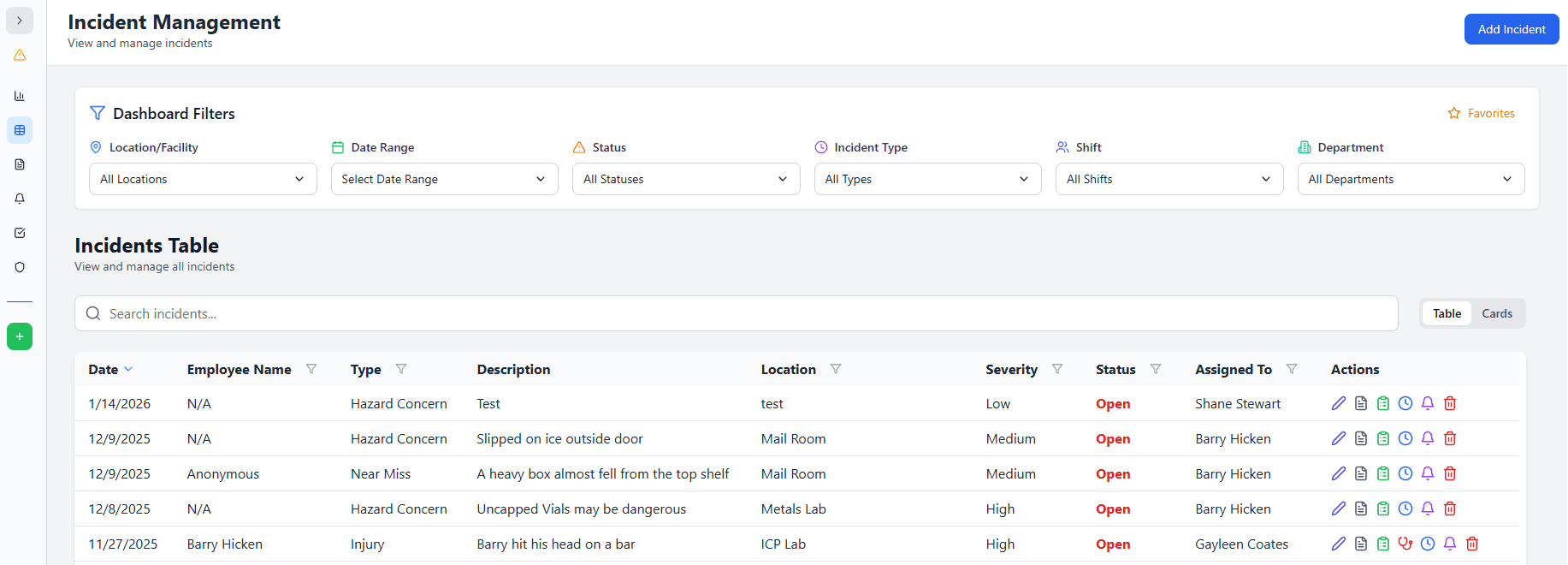
See Provisio Core incident management in action →
Implementation Success: How to Roll Out Digital Incident Management
Week 1-2: Configuration and Setup
- Import employee data and organizational structure
- Customize incident report forms for your operations
- Configure OSHA 300 log settings
- Set up user roles and permissions
Week 3-4: Training and Pilot
- Train safety managers and supervisors on the system
- Run a pilot with one department or location
- Gather feedback and refine workflows
- Develop quick reference guides for users
Week 5-6: Full Rollout
- Train all employees on how to report incidents
- Communicate the new process organization-wide
- Post visual reminders (QR codes, quick reference cards)
- Provide on-demand support for early adopters
Week 7-8: Optimization
- Review first month's data for trends
- Refine forms and workflows based on user feedback
- Celebrate early wins (faster response times, better documentation)
- Begin using analytics for proactive safety improvements
Most organizations are fully operational within 4-6 weeks.
Conclusion: Modernize Incident Management Today
Paper-based incident management is slow, incomplete, and reactive. Digital systems transform incident response from a compliance burden into a strategic safety tool.
Key Takeaways
✅ Digital incident management reduces investigation time by 85% ✅ Mobile reporting ensures incidents are documented immediately with photos ✅ Automated OSHA 300 logs eliminate manual data entry and errors ✅ Integrated corrective action tracking ensures findings don't get forgotten ✅ Analytics identify trends and drive proactive safety improvements ✅ ROI is measured in faster response, better compliance, and fewer repeat incidents
Stop letting incidents slip through the cracks. Modernize your incident management system and turn reactive reporting into proactive safety improvements.
Next Steps
- Request a demo of Provisio Core incident management
- Start a 30-day free trial
- Download our incident investigation template
- Talk to a safety expert
About Provisio EHS: We provide comprehensive safety management software built specifically for manufacturers, construction firms, and industrial operations. Our incident management system helps organizations respond faster, investigate thoroughly, and prevent repeat incidents.
Ready to Improve Your Safety Management?
Explore Provisio EHS solutions to streamline compliance and protect your workforce.
Schedule Your OSHA Audit
Let our industrial hygiene professionals identify your compliance gaps before regulators do.
Try Provisio EHS Free
Get 30 days of full access to our safety management platform. No credit card required.
Start Your Free TrialSee How It Works Together
Explore our Audit + Software Implementation Bundle. Get compliant and automate faster.
Get Bundle Pricing