
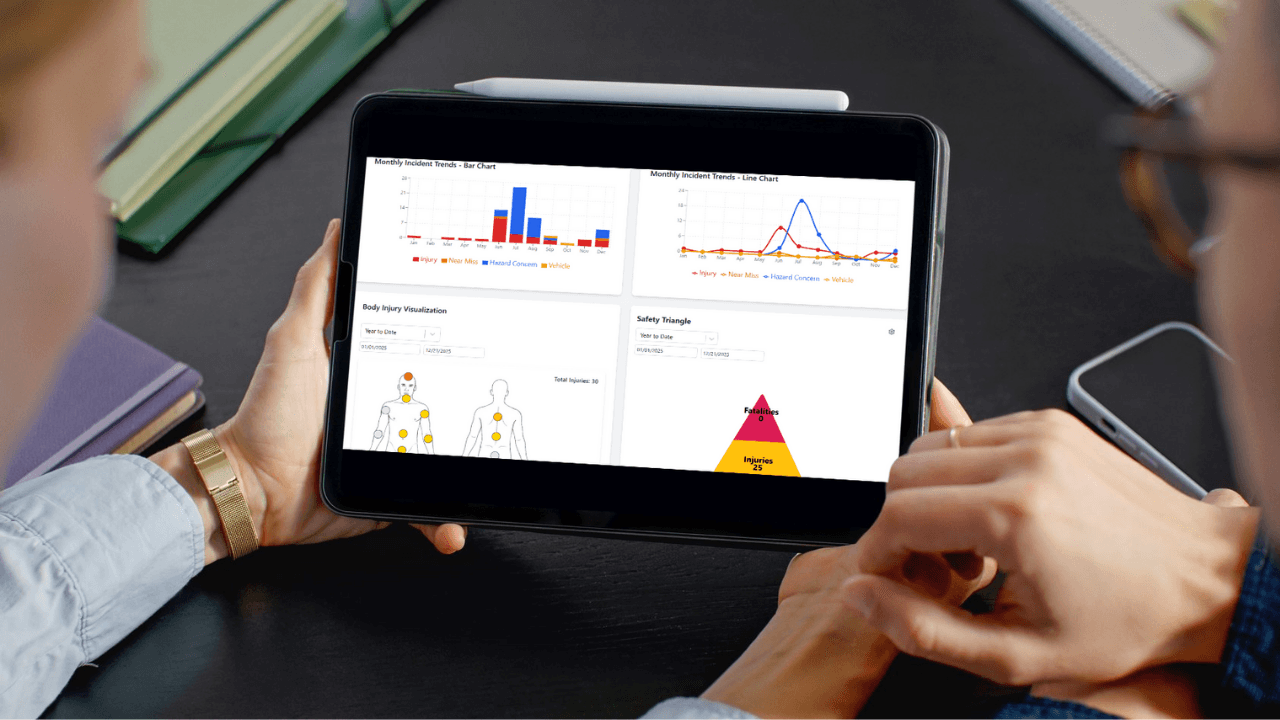
The EHS Software Landscape Is Confusing
You know your organization needs to modernize safety management. The question is: which system should you choose?
The EHS software market is crowded with options ranging from $50/month DIY tools to $500,000+ enterprise platforms. Most vendors claim to do everything, and it's nearly impossible to compare apples-to-apples.
If you're a safety manager at a manufacturer, construction firm, or industrial operation with 50-500 employees, this guide is for you. We'll cut through the marketing hype and help you find a solution that actually fits your needs and budget.
Common Mistakes When Buying EHS Software
Mistake #1: Buying Based on Features, Not Workflows
The problem: Vendors showcase dozens of modules and features. You get dazzled by capabilities you'll never use and overlook gaps in features you actually need.
The fix: Start with your workflows, not the software:
- How do incidents get reported today?
- How do inspections get completed and followed up?
- How do you track corrective actions?
- How do employees access training?
- How do you maintain OSHA 300 logs?
Then evaluate software based on how well it supports your actual processes, not theoretical capabilities.
Mistake #2: Choosing Enterprise Software for Mid-Sized Operations
The problem: Enterprise platforms (Cority, Intelex, Gensuite) are built for Fortune 500 companies with dedicated EHS teams, compliance officers, and IT departments. They're powerful but complex, expensive, and require months-long implementations.
Why it's wrong for SMEs:
- Cost: $30,000-$100,000+ annually for companies under 500 employees
- Complexity: Requires consultants to configure and maintain
- Overkill: Features designed for global corporations with 10,000+ employees
- Implementation time: 3-6 months minimum
The fix: Look for mid-market solutions purpose-built for organizations under 500 employees. You get 90% of the functionality at 20% of the cost.
Mistake #3: Choosing Software That Isn't Mobile-First
The problem: Your frontline workers are on production floors, construction sites, and in the field, not sitting at desks.
Why desktop-only software fails:
- Incidents aren't reported until someone gets back to a computer (if ever)
- Inspections require printing checklists, then manually entering data later
- Corrective actions can't be updated from the field
- Adoption rates are terrible because it's not convenient
The fix: Require mobile-first design where all core functions (incident reporting, inspections, corrective actions) work seamlessly on phones and tablets.
Mistake #4: Ignoring Implementation and Support
The problem: You focus on the sticker price of the software but ignore implementation costs and ongoing support quality.
Hidden costs to consider:
- Implementation fees: Can be 1-3x the annual software cost for enterprise systems
- Training time: How much time will it take to get your team up to speed?
- Customization: Do you need consultants to configure workflows?
- Data migration: Who will move your existing data into the new system?
- Support costs: Is quality support included or an expensive add-on?
The fix: Ask vendors for total cost of ownership (TCO) including implementation, training, data migration, and 3 years of support.
Mistake #5: Not Involving Frontline Users in the Decision
The problem: Safety managers and executives evaluate software, but frontline supervisors and employees are the ones who have to use it daily.
Why this fails:
- Systems that look great in demos are clunky in real-world use
- Complex interfaces that make sense to safety professionals confuse frontline workers
- Low adoption rates undermine the entire investment
The fix: Include frontline supervisors in vendor demos and pilot testing. If they can't use it easily, adoption will fail.
EHS Software Evaluation Framework
Use this structured approach to evaluate vendors:
Step 1: Define Your Requirements
Create a prioritized list of requirements in three categories:
Must-Have (Deal Breakers)
These are non-negotiable. If a vendor can't do these, eliminate them immediately.
Examples:
- Mobile-first incident reporting
- OSHA 300 log automation
- Corrective action tracking with reminders
- Inspection checklists (customizable)
- Reasonable pricing for your employee count
Nice-to-Have (Strong Preference)
Features that significantly improve the solution but aren't mandatory.
Examples:
- Integrated training LMS
- SDS management
- Multi-location support
- Custom reporting and dashboards
- Third-party integrations (HRIS, payroll)
Don't-Need (Avoid Paying For)
Features that sound impressive but you'll never use.
Examples:
- Global compliance tracking (if you only operate in the U.S.)
- Chemical risk modeling (if you're not a chemical facility)
- Process safety management (PSM) modules (if not required by your industry)
- Advanced analytics and AI (if you have 50 employees)
Step 2: Vendor Research and Shortlist
Narrow your options to 3-5 vendors that fit your size and industry:
Questions to Ask:
Company Profile:
- How many customers do you have in our size range (employee count)?
- What percentage of your customers are in [our industry]?
- How long have you been in business?
- What is your customer retention rate?
Product Fit:
- Is this designed for mid-sized operations or scaled down from enterprise?
- Can we see a demo focused on [specific workflows we care about]?
- What's included in the base platform vs. add-on modules?
- How customizable are forms, workflows, and reports?
Pricing:
- What is the all-in cost for [X] employees including implementation?
- Are there per-user charges or flat fees?
- What's included in support? Are there tiers or additional costs?
- What happens to pricing as we grow? Are there pricing tiers?
Implementation:
- What's the typical implementation timeline?
- Who handles data migration and setup?
- What training is included?
- Do we need consultants or can we do this ourselves?
Support:
- What support channels are available (phone, email, chat)?
- What are your support hours?
- What's your average response time for issues?
- Is there an additional cost for premium support?
Step 3: Request Demos Focused on Your Workflows
Don't accept generic vendor demos. Provide use cases and ask them to demonstrate:
Incident Management: "Show me how a supervisor reports an incident from their phone, how it routes to the safety manager, how we conduct the investigation, and how corrective actions are assigned and tracked."
Inspections: "Show me how we'd create a custom inspection checklist for our forklift pre-shift inspections, how operators complete it on a mobile device, and how findings generate corrective actions."
OSHA 300 Logs: "Show me how incidents are classified as recordable, how days away/restricted are calculated, and how the 300A summary is generated."
Training Tracking: "Show me how we track employee training certifications, set expiration reminders, and assign courses when certifications are about to expire."
Step 4: Pilot with a Small Group
Before committing to a full rollout, pilot the top 1-2 options with a small group:
- Select one department or location (20-50 employees)
- Use it for real work for 30 days (not just test data)
- Involve frontline supervisors in the pilot group
- Gather feedback on usability, mobile experience, and pain points
Ask pilot users:
- How easy is this to use on a scale of 1-10?
- What's the most frustrating part of the system?
- Would you want to use this company-wide?
- What's missing or confusing?
Step 5: Total Cost of Ownership Analysis
Calculate the 3-year TCO for each finalist:
Total Cost of Ownership (3 Years) =

Initial Costs:
+ Software license (Year 1)
+ Implementation/setup fees
+ Data migration costs
+ Training time (staff hours × hourly rate)
+ Customization/consulting fees

Ongoing Costs (Years 2-3):
+ Annual software license fees
+ Support/maintenance fees
+ Additional modules or users
+ Training for new employees

Subtract:
- Time saved (staff hours × hourly rate)
- Reduced workers' comp costs
- Avoided OSHA penalties
Example comparison:
| Enterprise Solution | Mid-Market Solution | DIY Tool | |
|---|---|---|---|
| Year 1 | $85,000 | $12,000 | $3,000 |
| Implementation | $50,000 | $2,000 | $500 |
| Training | $10,000 | $1,000 | $0 |
| Annual Cost (Yr 2+) | $60,000 | $10,000 | $3,000 |
| 3-Year Total | $255,000 | $34,000 | $9,500 |
| Per Employee (200) | $1,275/employee | $170/employee | $47.50/employee |
But also consider:
- Enterprise solution may be overkill with features you'll never use
- DIY tool may lack critical capabilities (OSHA 300 automation, mobile app)
- Mid-market solution balances cost and functionality
Key Evaluation Criteria
1. Usability and Adoption
Why it matters: The best software in the world is worthless if employees won't use it.
How to evaluate:
- Can a frontline supervisor report an incident in under 3 minutes?
- Do forms feel intuitive or require extensive training?
- Does the mobile experience feel like a modern app or a clunky website?
- Can employees access it without remembering complex passwords?
Red flags: ❌ Requires multiple clicks to complete simple tasks ❌ Tiny buttons and text on mobile devices ❌ Requires extensive training for basic functions ❌ Looks like software from 2005
2. Mobile Experience
Why it matters: Safety happens in the field, not at a desk.
How to evaluate:
- Is there a native mobile app or just a mobile-responsive website?
- Can all core functions be completed on a phone?
- Does it work offline and sync when connectivity returns?
- Can you capture photos directly from the camera?
Red flags: ❌ Desktop-first design that doesn't work well on phones ❌ Requires internet connection to function ❌ Can't upload photos or signature capture is clunky ❌ Must switch between multiple apps to complete workflows
3. Configurability
Why it matters: Your workflows are unique. Software should adapt to you, not the other way around.
How to evaluate:
- Can you create custom forms without developer help?
- Can you configure workflows (routing, approvals, notifications)?
- Can you customize reports and dashboards?
- Can you adjust user roles and permissions?
Red flags: ❌ Customization requires vendor assistance (billable hours) ❌ Fixed forms that can't be changed ❌ Workflows are hard-coded and inflexible ❌ Limited reporting options
4. Integration Capabilities
Why it matters: EHS software shouldn't be an island. It should connect with your existing systems.
How to evaluate:
- Can it integrate with your HRIS or payroll system?
- Can it sync employee data automatically?
- Does it offer APIs for custom integrations?
- Does it integrate with popular tools (Microsoft, Google Workspace)?
Red flags: ❌ No integration options (manual data entry for everything) ❌ Integrations cost extra and require IT involvement ❌ No API or developer documentation ❌ Can't export data in standard formats
5. Reporting and Analytics
Why it matters: You need to demonstrate program effectiveness to leadership and insurance carriers.
How to evaluate:
- Can you create custom reports without developer help?
- Are real-time dashboards available?
- Can you export data to Excel/CSV for further analysis?
- Does it calculate DART, TRIR, and other safety metrics automatically?
Red flags: ❌ Fixed reports that can't be customized ❌ No visual dashboards (just tables and lists) ❌ Can't export data easily ❌ Metrics require manual calculation
6. Support and Customer Success
Why it matters: You'll have questions and issues. Vendor responsiveness determines whether these are minor bumps or major roadblocks.
How to evaluate:
- What support channels are available (phone, email, chat)?
- What are their support hours? (24/7 or business hours only?)
- What's their average response time?
- Do they provide a dedicated customer success manager?
- Is there a knowledge base and training resources?
Red flags: ❌ Email-only support with 48+ hour response times ❌ Support costs extra (premium support plans) ❌ No phone support available ❌ Limited knowledge base or training resources ❌ Negative reviews about support quality
Provisio EHS Software: Built for Mid-Sized Operations
We designed Provisio specifically for manufacturers, construction firms, and industrial operations with 50-500 employees who need powerful safety management without enterprise complexity.
What's Included in Provisio Core
Incident Management:
- Mobile-first incident reporting with photo capture
- Guided investigation workflows and root cause analysis
- Automated OSHA 300 log maintenance
- Real-time DART and TRIR calculations
Safety Inspections:
- Customizable inspection checklists
- Mobile app for field use (works offline)
- Automatic corrective action generation
- Inspection scheduling and reminders
Corrective Actions:
- Centralized tracking dashboard
- Automated assignments and reminders
- Escalations for overdue items
- Photo verification of completion
Compliance Management:
- OSHA 300 log automation
- Training compliance tracking
- Document repository for safety programs
- Audit trails for all activities
Meetings and Communication:
- Safety meeting documentation
- Toolbox talk library
- Employee safety communications
- Attendance tracking
JSA/JHA Management:
- Job safety analysis library
- Custom JSA templates
- Mobile access for field reference
- Version control and approvals
AI-Powered Insights:
- Trend analysis and pattern detection
- Risk prediction and prioritization
- Automated recommendations
- Benchmarking against industry standards
Optional Add-On Modules
Training LMS:
- 200+ OSHA-aligned courses
- Custom course creation
- Automated certification tracking
- Mobile learning
SDS Management:
- Centralized SDS library
- Mobile access for employees
- Automatic update notifications
- Chemical inventory tracking
Pricing
Transparent, predictable pricing based on employee count:
- 50-100 employees: Starting at $500/month
- 101-250 employees: Starting at $800/month
- 251-500 employees: Starting at $1,300/month
Includes: ✅ Provisio Core platform (all features listed above) ✅ Implementation and data migration ✅ Unlimited users ✅ Mobile apps (iOS and Android) ✅ Training and onboarding ✅ Premium support (phone, email, chat) ✅ Quarterly check-ins with customer success
Optional add-ons:
- Training LMS: +$300-$600/month
- SDS Management: +$200-$400/month
Why Provisio Works for Mid-Sized Operations
✅ Purpose-built for your size: Not scaled-down enterprise software ✅ Fast implementation: 4-8 weeks to go live (not 6+ months) ✅ Mobile-first: Designed for frontline workers, not just safety managers ✅ Affordable: 70-80% less expensive than enterprise platforms ✅ No hidden costs: Transparent pricing with everything included ✅ Real support: Dedicated customer success team included
Request a demo focused on your workflows →
Questions to Ask Provisio (Or Any Vendor)
We believe transparency builds trust. Here are questions you should ask us (or any vendor):
Product Questions
- How many customers do you have in the [our industry] with [X employees]?
- Can you show me 3 customer references I can call?
- What's your customer retention rate? Why do customers leave?
- What's on your product roadmap for the next 12 months?
- How do you handle feature requests from customers?
Implementation Questions
- What does implementation involve and how long does it take?
- Who migrates our existing data (incidents, training records)?
- What training do you provide for our team?
- Can we pilot with one location before full rollout?
- What does "go live" mean, when are we fully operational?
Support Questions
- What support channels are available (phone, email, chat)?
- What are your support hours?
- What's your average response time for issues?
- Is support included or an extra cost?
- How do you handle bugs and feature requests?
Cost Questions
- What's the total cost for [X] employees including implementation?
- Are there any hidden costs or fees?
- What happens to pricing if we grow to [Y] employees?
- What's included in the base price vs. add-ons?
- Can we see a 3-year total cost of ownership projection?
Conclusion: Choose Software That Fits Your Reality
The right EHS software for a Fortune 500 company with 10,000 employees is not the right software for a manufacturer with 150 employees.
You need a solution that:
✅ Fits your budget ($3,000-$15,000 annually, not $50,000+) ✅ Works in the field (mobile-first, not desktop-only) ✅ Goes live in weeks (not months) ✅ Your team can actually use (intuitive, not complex) ✅ Includes real support (not premium add-ons)
Key Takeaways
✅ Start with your workflows, not vendor feature lists ✅ Involve frontline users in the evaluation process ✅ Prioritize mobile-first design for field workers ✅ Calculate 3-year total cost of ownership, not just annual license fees ✅ Pilot with a small group before company-wide rollout ✅ Choose vendors with strong support and customer success programs
Don't overpay for enterprise complexity you don't need. Find a solution purpose-built for organizations your size.
Next Steps
- Request a customized demo of Provisio Core
- Start a 30-day free trial
- Compare Provisio to other EHS software options
- Talk to a safety software expert
About Provisio EHS: We built our safety management software specifically for small and mid-sized manufacturers, construction firms, and industrial operations. We understand your challenges because we've worked in your facilities. Let us show you how Provisio fits your workflows without enterprise complexity or cost.
Ready to Improve Your Safety Management?
Explore Provisio EHS solutions to streamline compliance and protect your workforce.
Schedule Your OSHA Audit
Let our industrial hygiene professionals identify your compliance gaps before regulators do.
Try Provisio EHS Free
Get 30 days of full access to our safety management platform. No credit card required.
Start Your Free TrialSee How It Works Together
Explore our Audit + Software Implementation Bundle. Get compliant and automate faster.
Get Bundle Pricing